CDOT Road Conditions Colorado: Check Closures & Cameras
Colorado winters don’t announce themselves politely. One moment you’re driving under clear skies, and the next, a sudden storm closes I-70 through the mountains. Checking CDOT road conditions Colorado before you head out can mean the difference between arriving safely and getting stranded on a snowy pass.
Whether you’re a facility manager coordinating overnight snow removal crews or a business owner planning your morning commute, real-time traffic updates matter. Road closures, chain laws, and icy conditions directly affect how quickly your property gets cleared and when your team can safely arrive.
This guide walks you through exactly how to check CDOT’s live road conditions, access highway cameras, and interpret closure alerts. At Denver Snow & Commercial Property Services, we monitor these same resources daily to deploy our crews effectively and keep commercial properties accessible, even during the worst storms.
What CDOT road condition tools cover
CDOT maintains a statewide network of sensors, cameras, and reporting stations that track every major highway, mountain pass, and interstate in Colorado. When you check cdot road conditions colorado, you access data from over 350 roadside weather stations that measure pavement temperature, wind speed, and precipitation levels in real time.
Real-time highway monitoring
You can view live traffic cameras positioned at key intersections, mountain passes, and construction zones across the state. CDOT updates these camera feeds every 30 seconds, giving you actual visual confirmation of road surface conditions before you commit to a route. The system also tracks incidents, accidents, and emergency road closures as they happen, not hours after the fact.
CDOT’s COtrip platform combines camera feeds, sensor data, and crew reports into a single map interface you can check from any device.
Weather and safety alerts
Beyond cameras, CDOT provides detailed weather forecasts specific to each highway segment. You see warnings about black ice forming on I-25, sudden visibility drops near Eisenhower Tunnel, or high winds threatening Berthoud Pass. The system flags active traction law enforcement, so you know whether chains or winter tires are legally required before you start driving. CDOT also posts estimated reopening times for closed roads, helping you plan alternate routes or delay trips until conditions improve. This information updates continuously throughout winter storms, ensuring you make decisions based on current conditions rather than outdated reports.
Step 1. Check COtrip map for closures and delays
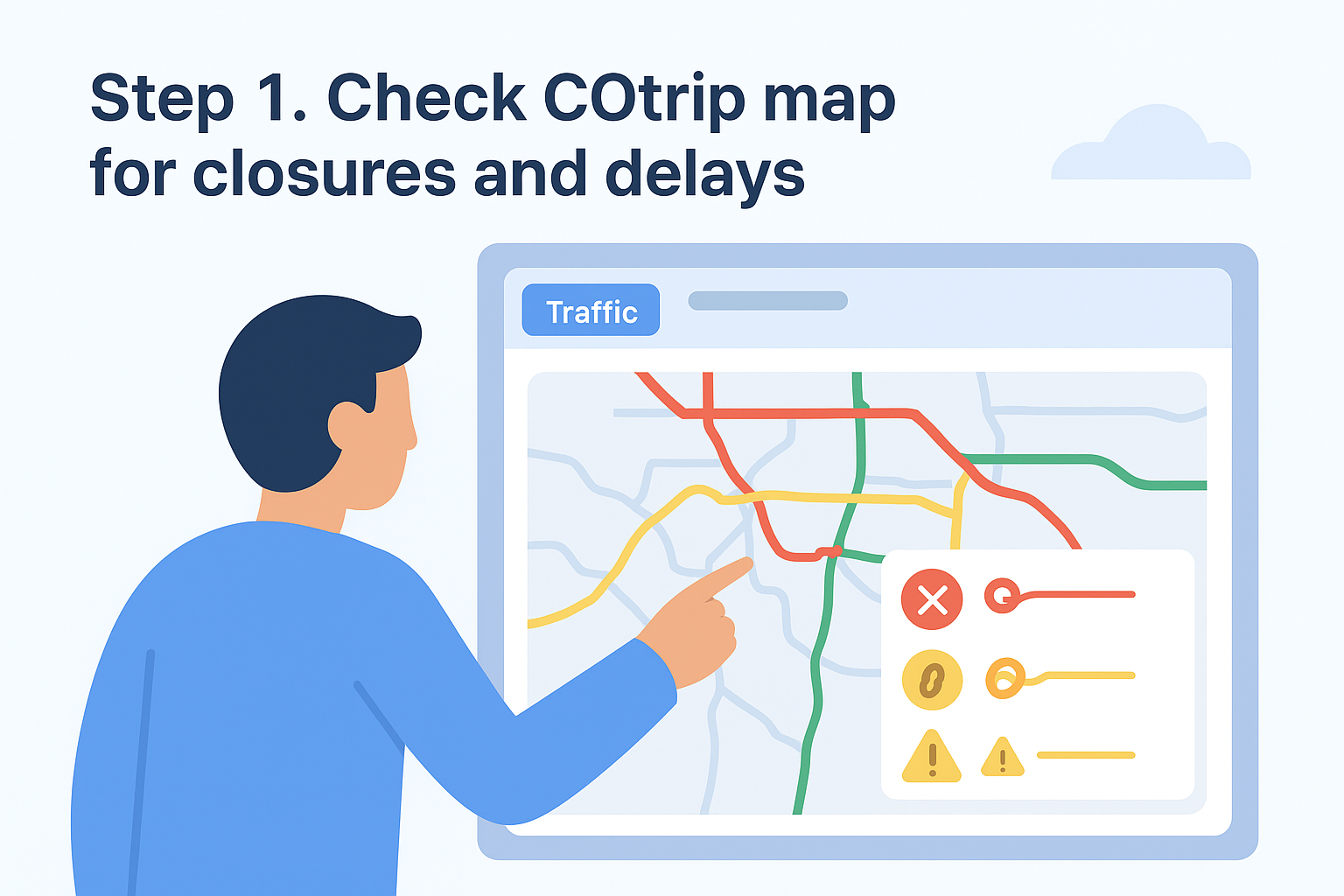
Your first action every morning should be opening the COtrip map before any crew departs. Visit cotrip.org from any browser, and you immediately see Colorado’s full highway network color-coded by current conditions. Red lines indicate closures, yellow shows delays, and green confirms normal traffic flow. This map updates every two minutes, so you’re not looking at stale information from the night shift.
Access the map interface
Click the "Traffic" button in the top navigation bar to display all active incidents. You can toggle layers to show construction zones, weather stations, and camera locations simultaneously. Zoom into your specific routes by typing an address or clicking directly on the highway segment you need. The interface works identically on desktop computers and mobile devices, letting your crew chiefs check conditions from their trucks before leaving the yard.
Read closure symbols and color codes
COtrip uses standardized icons to mark different road conditions. A red X symbol means complete closure with no estimated reopening time. A chain icon indicates traction law enforcement, requiring chains or approved winter tires. Yellow triangles warn of partial lane closures or reduced speeds due to weather. When you see multiple symbols clustered together, click each one individually to read the full incident description and timestamp.
Checking cdot road conditions colorado through COtrip before dispatch prevents your teams from arriving at closed mountain passes or parking lots they cannot safely clear.
Step 2. Use cameras, weather, and pass reports
After you identify potential closures on the main map, your next move is confirming actual conditions through live cameras and weather station data. COtrip positions over 400 cameras along major corridors, mountain passes, and urban interchanges. Click any camera icon on the map to open a live image stream that refreshes every 30 seconds, showing you exactly what drivers see at that moment.
View live highway cameras
Select the camera closest to your destination or along your planned route. You can compare multiple camera feeds by opening several in separate browser tabs, giving you a visual timeline of conditions as elevation changes. Look for accumulating snow on pavement, visible lane markings, and traffic density. When checking cdot road conditions colorado for mountain passes, prioritize cameras at the summit and base to gauge the full vertical climb your crews will face.
Read weather station reports
Click the weather station icons (blue circles with thermometer symbols) to view current pavement temperature, air temperature, wind speed, and precipitation type. These stations update every 15 minutes and include historical graphs showing temperature trends over the past 6 hours.
Weather stations reveal black ice conditions that cameras cannot detect visually, especially during clear nights when temperatures drop below freezing.
Step 3. Confirm rules, traction laws, and detours
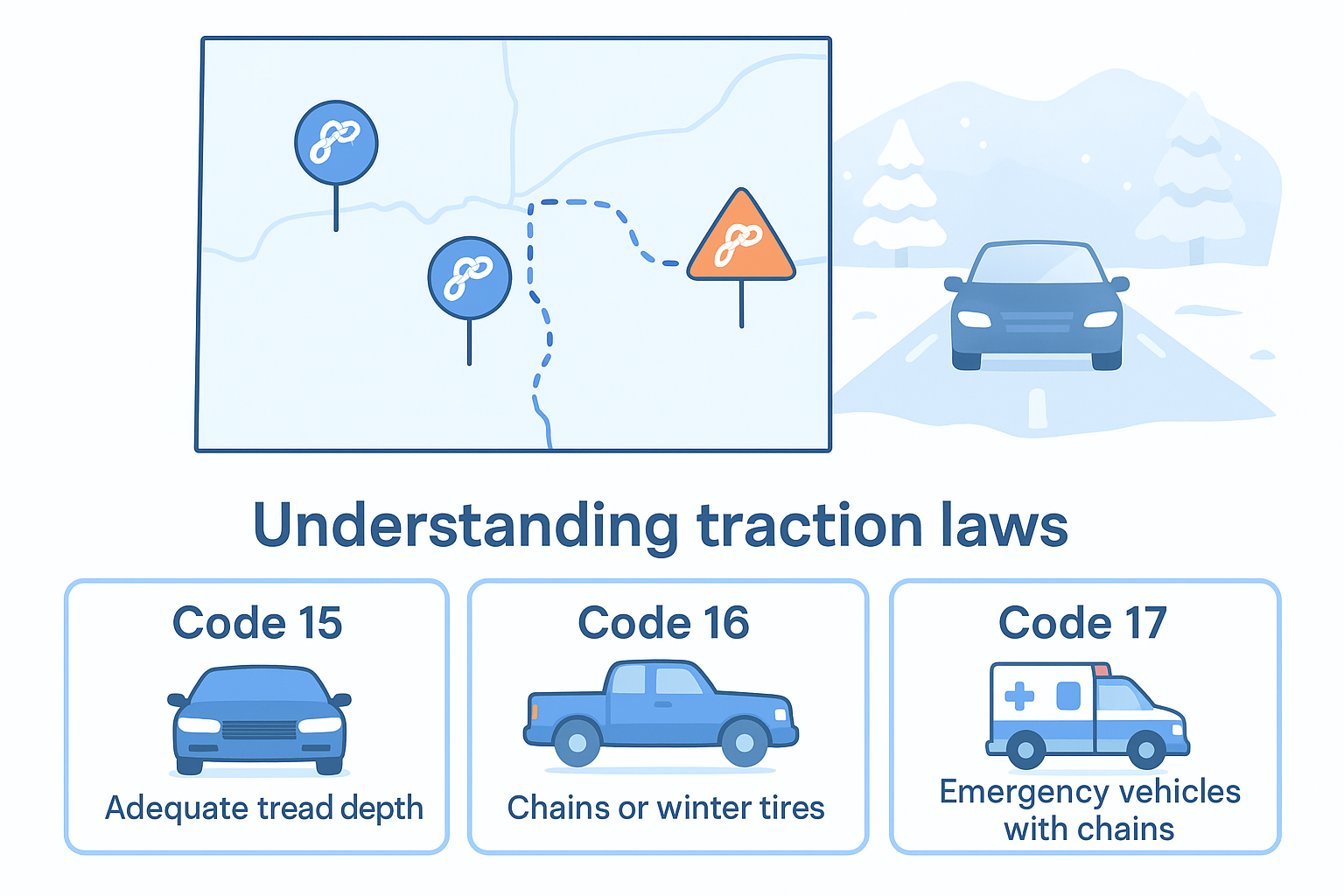
Once you understand current conditions through cameras and weather stations, you need to verify legal requirements before your crews hit the roads. CDOT enforces three traction law levels during winter storms, and violations result in fines starting at $650 plus potential liability if your vehicle causes an accident. Check the COtrip map for chain symbols and click each one to read the specific enforcement level active on that highway segment.
Understanding traction laws
Colorado implements three traction law categories depending on storm severity. Code 15 requires passenger vehicles to have adequate tread depth but allows most commercial trucks to proceed normally. Code 16 mandates chains or approved winter tires for all vehicles. Code 17 closes roads to everyone except emergency vehicles with chains. When checking cdot road conditions colorado, look for the small chain icon with a number next to it on the map. Click the icon to see exact requirements and enforcement boundaries, because the law can change every few miles as elevation increases.
CDOT updates traction law enforcement status every 30 minutes during active storms, so recheck before each crew departure window.
Finding official detour routes
When highways close completely, CDOT posts signed detour routes using orange diamond markers on physical road signs. The COtrip map displays these detours as dotted purple lines overlaying the closed road segment. Click the closure icon to read recommended alternate routes with estimated additional travel time. Save multiple backup routes for critical properties, especially those near mountain passes where closures can last 12+ hours during severe avalanche conditions.
Step 4. Set up quick checks for your team
Your crews need immediate access to road conditions without hunting through multiple websites or calling dispatch for updates. Setting up streamlined check procedures reduces decision time and prevents delays when weather changes mid-shift. Create a system where every driver and crew chief can verify cdot road conditions colorado in under two minutes before leaving for a job site.
Create a bookmark routine
Save COtrip.org as the first bookmark in every work vehicle’s phone or tablet browser. Add specific camera URLs for your most frequent routes by clicking a camera view, copying the direct link, and saving it as a separate bookmark. Your drivers can then open three to five critical cameras instantly without navigating the full map each time.
Example bookmark set for I-70 corridor crews:
- COtrip main map: cotrip.org
- Eisenhower Tunnel camera: [camera-specific URL]
- Georgetown Hill weather station: [station-specific URL]
- Vail Pass conditions: [segment-specific URL]
Build a morning checklist
Print a laminated checklist for each vehicle that lists the exact information drivers must confirm before dispatch. Include checkboxes for closure status, active traction laws, and camera verification at three key points along their assigned route. Require photo documentation of the COtrip screen showing green (clear) conditions before authorizing departure.
Standardized checklists eliminate guesswork and create documentation showing your team verified safe conditions before every winter deployment.
Final takeaways
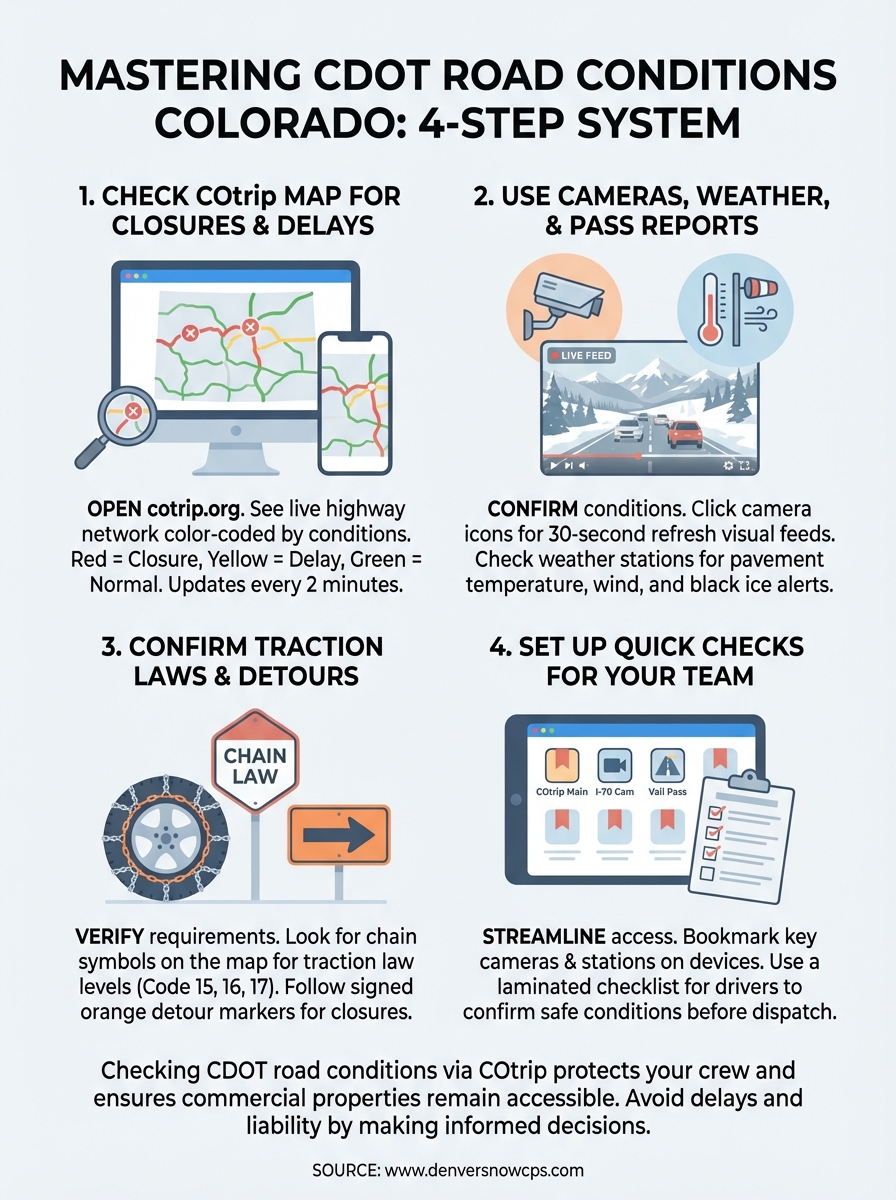
Checking cdot road conditions colorado through COtrip before every winter deployment protects your crew and keeps your commercial properties accessible when clients need them most. You now have a four-step system: verify closures on the main map, confirm conditions through cameras and weather stations, check traction law requirements, and create streamlined access for your drivers.
Your teams cannot plow parking lots they cannot safely reach. Winter storms close Colorado highways without warning, and outdated information puts your crew at risk. Build camera bookmarks, print vehicle checklists, and require photo documentation before every departure. These small steps prevent costly delays and liability exposure during the busy winter season.
Denver Snow & Commercial Property Services monitors CDOT road conditions around the clock to deploy crews when your property needs clearing. Our 40+ years of Denver winter experience means we know which routes stay open and when to delay deployment for safety. Contact us to discuss how professional snow management keeps your business running through every Colorado storm.